The problem. People details sit in one file, hiring in another, time off in an inbox and review dates in memory. Nobody has one clear view of who is on probation, where each candidate is up to, who is off today or which reviews have slipped.
What this does. You keep one list of people, one of candidates, one of time off and one of reviews. The workbook counts headcount by department, works out probation end dates and next review dates, tracks each candidate through your hiring steps, and shows who is off and which reviews are due or overdue.
What you can do with it
- See active headcount, people who have left and new starters in the last 30 days.
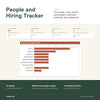
- See people by department, as a table and a bar chart, with probations ending and people with no review yet.
- See candidates by stage, offers outstanding, average days to hire and the best hiring source.
- See who is off on the report date and how many time-off requests are pending.
- See reviews overdue, due soon and people with no review on record.
- Type your own probation length, leave allowance, leave year and review months on Settings. Nothing is built in as a rule.
- Choose your industry (home services, professional services or retail) to load suitable job title, hiring source and department lists, then edit them to suit you.
- Keep your records in a clear structure: a Data Dictionary explains every column, and four export sheets repeat your people, candidates, time off and reviews under plain field names.
How it works
- Enter your business name, choose your industry, and type your own numbers on Settings.
- Add your people, then candidates, time off and reviews.
- Check the dashboard.
Who it is for. Employers, sole traders taking on their first staff and small teams who manage people from a list and want to see headcount, hiring progress, time off and reviews in one place.
Who it is not for. Businesses that need payroll, pay or bank records, leave approval or reminders. This is a spreadsheet: it does not send anything, approve leave, store pay details or connect to your email or calendar.
What you need. Microsoft Excel 2016 or later. It was tested in Excel for Windows. No macros, no add-ins and no subscription.
Good to know
- 300 people, 500 candidate, 1,000 time-off and 600 review rows are ready, and you can add more by dragging the last row down.
- Time off days are typed by you; half a day is 0.5.
- An example copy with a made-up business shows every sheet working before you start.
- Nothing is locked or password protected.
- Use this template to capture and improve your business data now. In future you can automate with AI.
- General information only. It is not accounting, tax, legal or financial advice.